
Instacart: Get Food Delivery
InstacartFood & Drink
4.8143.29K Reviews
- Version
- 9.41.0
- Installs
- 10.00M
- Age Rating
- Everyone
Screenshots

Our Review of Instacart: Get Food Delivery
 Analysis by Appyee
For me, the most revealing test of a grocery app is not how quickly I can add a snack, but how well it supports the whole trip: finding products, making choices, handling substitutions and receiving a delivery when a store visit is awkward or difficult. Instacart: Get Food Delivery is a free food-and-drink app from Instacart that brings grocery and retail shopping into one mobile workflow. It is aimed at people who want to shop from participating local stores without making the trip themselves, and I find that convenience most valuable when time, travel or the task of navigating a busy shop is the main obstacle.
Reading the shop and finding a route through it
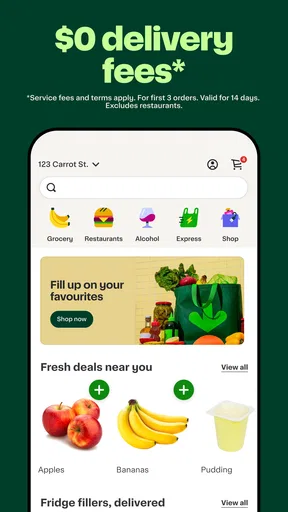
The app’s basic shopping pattern is easy to grasp: choose a store, browse or search, add what you need, then review the order. That familiar structure helps keep the task manageable. The original experience described here has categories and a search bar, along with saved favorites; those tools matter because a grocery order can quickly become a long list rather than a quick purchase. If I already know the brands I buy, searching or reusing familiar items is less demanding than browsing every aisle on screen.
Store choice also shapes the experience. Instacart connects shoppers with a large range of local grocery and retail brands, and the store summary describes access to more than 1,800 brands. That breadth can be useful when one shop does not carry a preferred item, but it also means comparing stores may take extra attention. I would choose the store before building a large cart, then check that the key items are available there instead of repeating the same search across several shops.
For readability and navigation, the strongest point is the straightforward shopping logic, not any claim of special accessibility certification. Categories can help someone who prefers browsing, while search can be faster for a shopper who knows a product name. A practical tip is to keep the list grouped around a meal or routine—breakfast staples, ingredients for dinner, household basics—rather than adding items in a scattered rush. Reviewing the cart once before checkout is worthwhile: it gives me a chance to spot duplicates, confirm quantities and catch an item that search results may have made easy to overlook.
Different hands, senses and shopping routines
Delivery can reduce the physical work of a grocery trip: walking aisles, carrying bags and making a journey home. That makes the service potentially useful for someone recovering from an injury, managing fatigue, caring for a child, or simply trying to avoid a crowded shop. It does not remove every effort. A customer still needs to make choices on a screen, respond to an out-of-stock message when necessary and be ready to receive the order, so I would not treat delivery as a completely hands-off arrangement.
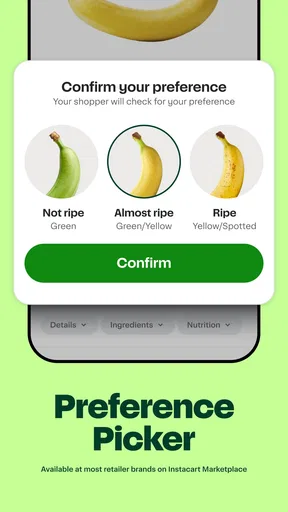
The app’s updates and substitution prompts can support people who prefer to know what is happening rather than wait without information. At the same time, notifications can interrupt someone who finds frequent alerts distracting, and replacement decisions can be stressful when the item is important or tied to a dietary need. I would check the cart carefully and think through acceptable alternatives before placing an order. If a particular ingredient must be exact, it is safer to pay close attention to the item and replacement choices than to assume every substitute will suit.
For a sensory-sensitive shopper, remote browsing may avoid the noise, lights and crowds of a physical store. But a phone screen is not automatically easier for everyone: small text, a long product list or repeated prompts can still be tiring. I recommend shopping in short passes—first essentials, then optional items—and pausing before checkout if the screen starts to feel cluttered. Those are general ways to reduce decision load; the app’s usefulness will still depend on an individual’s comfort with mobile shopping.
When delivery fits—and when another approach wins
A realistic use case is getting home late and realizing that breakfast supplies and ingredients for tomorrow’s dinner are missing. Instead of spending the remaining evening travelling to a shop, I can build a cart from a nearby retailer, select a delivery time that suits the household and follow the order as it is picked and brought over. Scheduling and order updates are especially helpful here because they make the plan easier to fit around work or caregiving. The trade-off is that the shopper may encounter an unavailable product, so I would avoid leaving a time-sensitive meal dependent on one hard-to-replace ingredient.
Compared with shopping in person, the clear gain is avoiding the trip and the physical handling of goods; the loss is direct control over choosing each piece of produce or checking a package myself. Compared with a store’s own ordering option, Instacart’s multi-brand approach can make it easier to browse different retailers in one app, while a store-specific service may be preferable to someone who wants to stay within one retailer’s ordering system. For a small, immediate need, walking to a nearby shop may also be simpler than arranging a delivery. The better choice depends on whether saving time and effort matters more than selecting every item personally.
I would especially consider Instacart if I regularly need groceries delivered, have a packed schedule, have limited transport, or find carrying a full shop difficult. It is less compelling if I enjoy choosing produce in person, want the lowest possible total, live close to a shop and can get there easily, or dislike dealing with substitutions. Costs deserve a deliberate check: the app is free to download, but delivery fees and possible price markups can make an order more expensive than shopping in person. A membership may be worth investigating for frequent use, but I would compare its terms with my own ordering habits rather than assume it saves money.
Simplifying Grocery Shopping
The first thing you notice about Instacart: Get Food Delivery is its super user-friendly interface. The app is designed to make your grocery shopping experience as seamless as possible. Once you’ve entered your location, the app connects you to a wide array of local grocery stores. No more wandering around; just a few taps and you’re good to go!
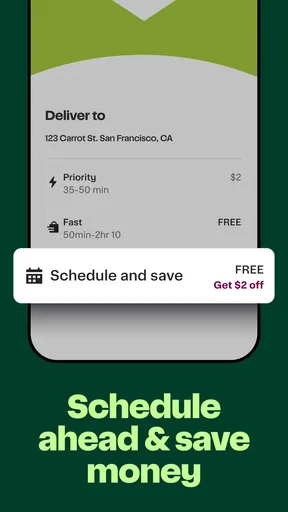
What I really loved is the feature that allows you to schedule your deliveries. You can opt for same-day delivery or set a specific time in the future. It’s like having a personal shopper at your beck and call, without the snide comments about your snack choices!
A Plethora of Choices
Instacart offers a vast selection of products from various stores. Whether you’re looking for organic produce, specialty items, or your favorite brand of cereal, the app has got you covered. I was pleasantly surprised by the variety, and let’s be honest, options are always a good thing.
Adding items to your cart is a breeze. The app keeps it simple with categories and a search bar that actually works—hallelujah! Plus, you can save your favorite items for future orders, which is a total time-saver.
Staying in the Know
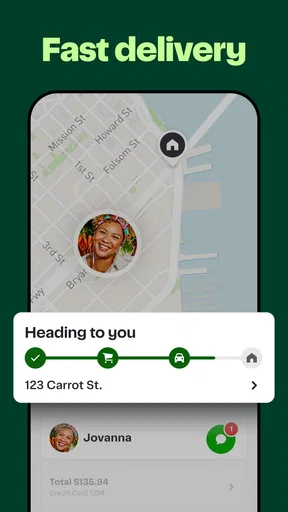
One of the standout features for me was the real-time updates. From knowing when your shopper starts picking your items to tracking your delivery, Instacart keeps you in the loop. It’s like having a grocery store GPS.
The app also provides notifications if an item is out of stock and suggests replacements. While this might be a bummer if you really wanted that specific brand of ice cream, it’s nice to know you won’t be left empty-handed.
Is It Worth It?
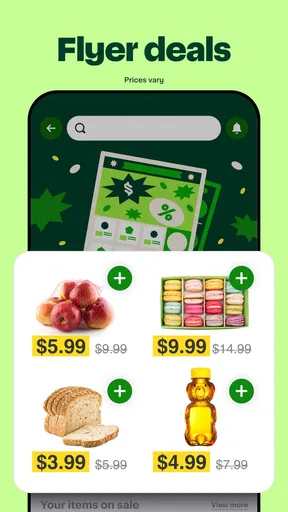
Now, let’s talk about the cost. While Instacart offers a convenient service, it comes with delivery fees and potential price markups. If you’re pinching pennies, this might be a consideration. However, for the convenience of having groceries delivered right to your doorstep, many find it worth the extra bucks.
The app also offers an Instacart Express membership, which can save you on delivery fees if you’re a frequent user. So, if you’re planning to make Instacart a staple in your shopping routine, it might be worth checking out.
As a product, it has a long track record: it launched in 2014, has reached more than 10 million installs and holds an average rating of 4.1 from around 309,000 ratings. Its age rating is Everyone, and version 8.97.3 is the current release. Those figures suggest a widely used service, but they do not settle the personal question of whether it fits your routine; store coverage, item selection and the cost of a particular order still matter more to me than popularity alone.
One useful way to make the service less frustrating is to treat the first order as a test rather than a complete replacement for your usual shopping. Pick familiar products, avoid building a meal around one obscure item, and see how the selected store handles the essentials you buy most. If the experience works, saved favorites can make future orders quicker. If it does not, you have learned which part is the problem—store selection, substitutions, delivery timing or total cost—before relying on it for a large weekly shop.
There is also a practical difference between convenience and certainty. Ordering through the app can simplify planning, but a product shown in a digital catalog is not the same as personally checking a shelf. For produce, specialty goods or anything where a specific size or version matters, I would read the product details and keep an eye on picking updates. When an alternative would change a recipe or create a dietary concern, the right move may be to choose a different item in advance or buy that one product in person.
Another question people reasonably have is whether delivery will suit a changing schedule. Scheduling gives the order a place in the day, while tracking helps me follow its progress; neither means I should ignore the delivery window or assume someone else can handle every last step. I would place an order when I can be available to manage a substitution and receive the groceries. If plans are unpredictable, a quick local shop or a later order may be less stressful than trying to coordinate a delivery around a moving appointment.
For households with different needs, the shared list itself can be the harder part than finding a product. I find it useful to agree on essentials and acceptable replacements before ordering, especially when more than one person will eat the food. That small bit of preparation reduces the chance that a shopper’s sensible substitute turns out to be wrong for someone at home. It also helps keep optional treats from crowding out the items the household actually needs.
Overall, Instacart: Get Food Delivery is a solid choice for anyone looking to save time on grocery shopping. With its ease of use, variety, and reliable delivery, it’s definitely a game-changer. Whether you’re a busy parent, a workaholic, or just someone who dreads the grocery store, this app is a lifesaver. So, why not give it a try and see how it fits into your lifestyle?
An inclusive fit, with real limits
My inclusive verdict is positive but conditional. The app can make grocery access more practical for people who find travel, crowds or carrying bags difficult, and familiar search and favorites can take some repetition out of ordering. It is not equally easy in every situation: someone who struggles with screen-based browsing, needs exact control over every item, or cannot respond to a replacement decision may find the process less accessible than the doorstep delivery suggests. I would choose it when reducing the physical trip is the priority, and choose in-person shopping or another familiar ordering route when direct selection and certainty matter more.
Instacart is best thought of as a flexible option, not a universal substitute for every grocery run. I would keep it in my routine for planned orders, heavy essentials and days when leaving home is a poor use of time or energy. For a budget-sensitive shop, a spontaneous purchase or produce I want to inspect myself, the usual store visit may still be the better call. That balance is what makes the app useful: it can remove a particular barrier without pretending that delivery removes every barrier.
Privacy and Permissions
See what permissions an app requests and how it handles your data.
- Location
- approximate location (network-based), precise location (GPS and network-based)
- Phone
- read phone status and identity
- Photos/Media/Files
- read the contents of your USB storage, modify or delete the contents of your USB storage
- Storage
- read the contents of your USB storage, modify or delete the contents of your USB storage
- Camera
- take pictures and videos
- Microphone
- record audio
- Wi-Fi connection information
- view Wi-Fi connections
- Device ID & call information
- read phone status and identity
- Other
- view network connections, control flashlight, full network access, change your audio settings, run at startup, control vibration, prevent device from sleeping, read Google service configuration
Verdict
Strengths of Instacart: Get Food Delivery
- User-friendly interface for easy navigation.
- Wide range of grocery stores available.
- Real-time order tracking feature.
- Customizable shopping lists.
- Option for contactless delivery.
Limitations of Instacart: Get Food Delivery
- Service fees can be high.
- Availability varies by location.
- Occasional delivery delays.
- Limited selection for specialty items.
- Some stores have higher prices online.
Other Releases by Instacart
View All
Instacart Shopper: Earn money
Shopping4.2

El Super
Food & Drink4.2
Similar Picks in This Category
View All
Rappi: Food Delivery, Grocery
Rappi, Inc - Delivery3.5

McDonald’s: Cupons e Delivery
Arcos Dorados4.3

Swiggy: Food Instamart Dineout
Swiggy4.7

Blinkit: Groceries & more
Blinkit4.8

foodpanda: food & groceries
Foodpanda GmbH a subsidiary of Delivery Hero SE4.0

Zomato: Food Delivery & Dining
Zomato4.7
Frequently Asked Questions
What is Instacart and how does it work?
Instacart is an app that allows users to order groceries and other essentials from local stores and have them delivered to their doorstep. Once you sign up, you can browse through various stores, add items to your cart, choose a delivery window, and a personal shopper will fulfill your order. It’s a convenient solution for those who prefer to shop from home.
Are there any fees associated with using Instacart?
Yes, Instacart charges a few different types of fees. There is a delivery fee that varies based on your order size and delivery time. Additionally, there may be a service fee, and tipping your shopper is encouraged but optional. Instacart Express members can benefit from reduced delivery fees on orders over a certain amount.
How is the quality of the products ensured?
Instacart hires personal shoppers who carefully select items based on your preferences. You can communicate with your shopper through the app to discuss product availability and preferences. If an item is out of stock, you can approve substitutions or request refunds. The app’s rating system helps ensure shoppers maintain high-quality service.
Can I use Instacart for same-day delivery?
Yes, Instacart offers same-day delivery depending on your location and the availability of delivery slots. You can often receive your order within a few hours. It’s advisable to check the app early in the day for the best selection of delivery times, especially during peak hours or holidays when demand is higher.
What stores are available through Instacart?
Instacart partners with numerous local and national retailers, including grocery stores, pharmacies, and specialty shops. The selection of stores varies by location. When you enter your zip code in the app, it will show the available stores in your area, allowing you to choose your preferred shopping destination.
